Wifi Localization
Please Log In for full access to the web site.
Note that this link will take you to an external site (https://shimmer.mit.edu) to authenticate, and then you will be redirected back to this page.
- First we'll discuss what WiFi-localization is and how it works.
- then we'll generate a POST request and target it at Google's Geolocation API based on WiFi information that the ESP32 collects. This will require some work with string formatting in C.
- Next we will analyze what is returned by the API (make sure it placed us correctly and that we know how to interpret it)
- Finally we will then parse the response that comes back from the API and display its result on our LCD.
In developing embedded systems, accurate knowledge of location is critical to many operations. Obvious examples of this include navigation aids, such as car or phone-based directions during travel. Entire companies (Uber, Lyft, those bike share companies, etc) are built on the ability to know the exact location of numerous mobile computational systems and used together to provide services. Many public transit systems also now provide live information about the location of all vehicles in their fleets, a service which is reliant on accurate real-time knowledge of position (this site is a real-time map of all trains active in Boston's MBTA, for example, and similar sites exist for other cities). How do these systems work?
While in some situations, we may be interested in the relative position of a device within a local region such as a room.1 In our class we are usually more concerned with geopositioning, which means determining the location of the device on the planet Earth as a whole. In general, we usually want a human-scale level of accuracy on the order of a few meters as well. For computational systems there are a few options and methods that have been put in place to provide this service, often with much better performance than what a human could do.
The first option is to use signals from a series of satellites that have been placed in the sky by various governments/organizations. The location and signals from these satellites are highly calibrated and by accumulating and analyzing the signals from several of them, it is quite easy for even an inexpensive earth-bound digital system to determine its approximate location on earth with decent accuracy (on the order of meters). This system relies on analyzing the different time-delays it takes for satellite signals to reach a certain place (since they all travel at the finite speed of light).
In previous years of 6.08 we'd actually perform geopositioning via this method. The 6.08 kit would feature a GPS module (shown below) and this would lock onto satellites in either the US, EU, or Chinese satellite systems, and from that it would report out its latitude and longitude on earth. We won't do that this year2. What are the other options available for geopositioning?
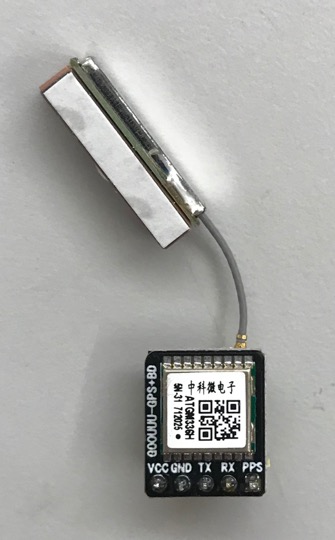
GPS satellites make up a system of transmitters that broadcast unique information that can be linked back to a known point in space. By analyzing attributes of the signals received at a point on earth, enough information can be collected to estimate approximate position of the receiver. Perhaps somewhat unintentionally, this same idea can be applied to other networks of transmitters that exist. As it turns out, the transmitting stations in our cell and WiFi networks can be used for the same purpose, although the details of implementation are a bit different.
Surrounding us are millions of WiFi Access Points. Each access point has a globally unique3 identifying number known as a Media Access Control (MAC) address, a 6-byte value which is conventionally specified in hexadecimal with colons separating each byte, for example: 84:d4:7e:09:a5:f14. In the process of broadcasting its presence, the access point will broadcast its MAC address. You can see this when you have run any of our WiFi-connecting code in 6.08 where all the information about each router is dumped out in the setup. In addition, each access point will generally exist on one of 14 channels in the 2.4 GHz wifi band (these are just like channels on a conventional radio station and exist to spread out traffic so things don't jam and interfere). In addition, the further you are from an access point, the weaker its signal will appear. On the ESP32, the signal intensity is reported in dBm, which is a logarithmic power level referenced to one mW.
Taking this all together, when a WiFi-enabled device surveys the "landscape" of available networks to connect to, it is somewhat unintentionally collecting a list of information that could be used to localize off of these WiFi access points, if only we had a record of where all those WiFi Access Points are on Earth. Amazingly, a record of this already exists. A number of companies and services have spent the last decade building up massive databases of WiFi access points on earth as well as what channels they operate on and where they are located on the planet. As a result, if we get a list of the MAC addresses and their WiFi channels and signal strengths, we can actually query these services with info about the access points to tell us where we are at.
Localization based off of ID, frequency, and signal strength of wireless transmitters has been used for almost 100 years so this is nothing new.5 However prior to WiFi, the density of known unique transmitters was orders of magnitude less than what was available with other communication mediums. Several of the leading WiFi-Positioning archives today have over a billion entries in their databases (see table at the bottom of this article), which they have generated by harvesting user data over the last decade6.
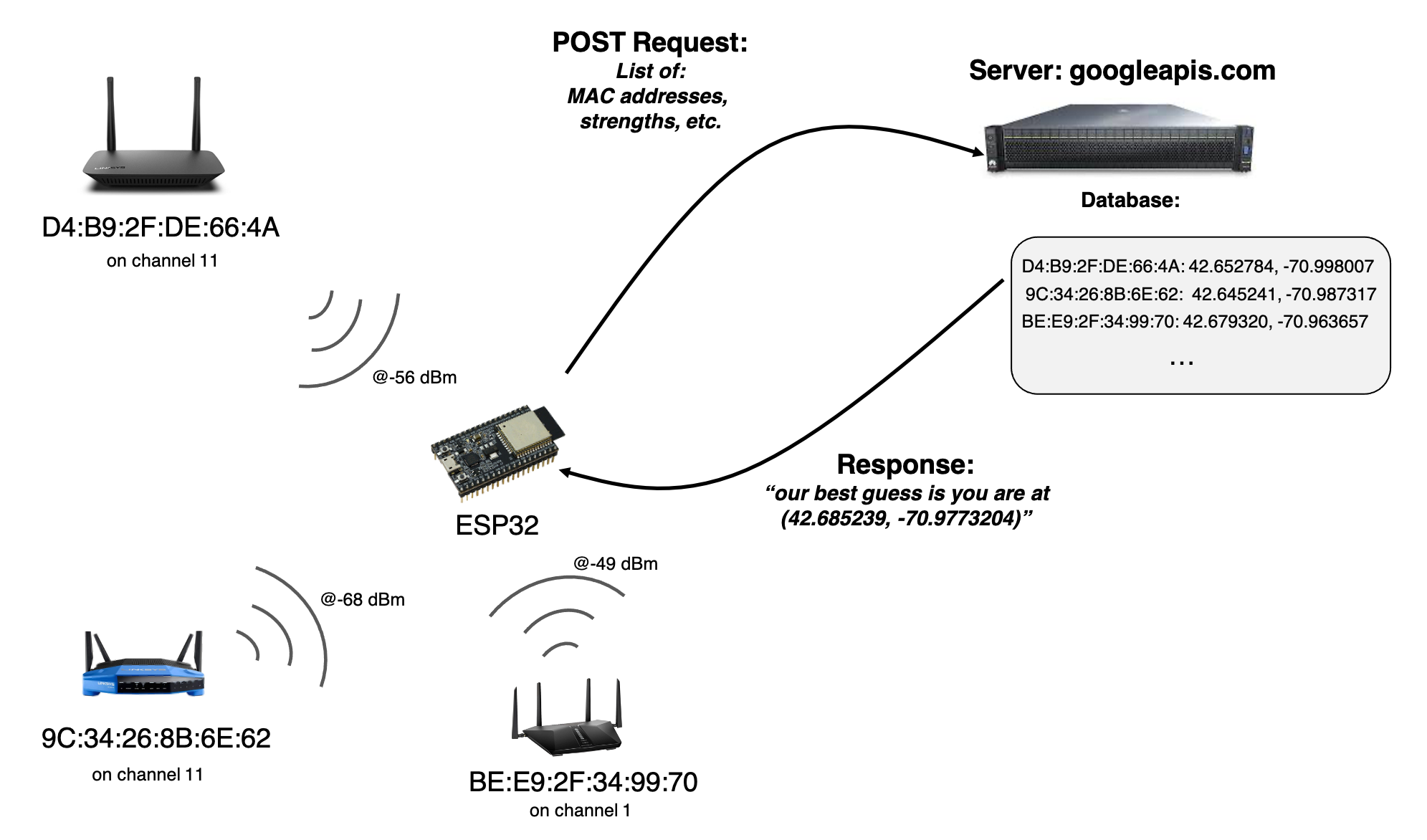
Anywho our goal for today is to collect some WiFi networks, and send this information up to Google to get our position on earth. Let's get started.
The starter code for today's Lab can be found HERE.
There is only one zip file for today. Download it. There are two files in this, which will appear as two tabs inside the Arduino IDE. The second one, support_functions , contains a few functions that are used in the operation of the main file. They could have been put all in one file, but doing it this way just splits it up nicer. There are no modules to add to the board today.
608_24G,pw:608g2020 is a good network to be on as well as EECS_Labs,(no pw) or MIT,(no pw), depending on where you are in the rooms.The code that you start with is actually pretty similar to the code we've had for other labs that connect to the internet and then work with servers. After it connects to the internet, it'll be running a simple state machine which executes an action on pressing the button on pin 45. That action is the topic of lab today.
One new feature in this lab is that we'll be communicating with a server owned and operated by Google. This requires us to do a few different things.
- We will be targeting a POST request at Google with our WiFi information. Unlike all other servers we've interacted with previously, Google requires we connect over HTTPS (which is HTTP secure). We'll talk more about this in upcoming lectures, but for lab today it means we need a different connection infrastructure to link to their server (
WiFiClientSecureas opposed toWiFiClientof previous labs). We've wrapped this functionality into a new functiondo_https_requestfound in thesupport_functionspage. - Google is a company, which means its only legally mandated purpose is to make money. This means they do not give stuff away for free. If you get something from Google, they are getting something from you in return. This extends to using their APIs. We have to pay to use their services and Google gave us an API key so they know who to bill7. That API key is for the 6.08 class that is included in the lab code for today. It will grant you access to use Google's Geolocation API. Do not abuse this key. It is not to be used for your own purposes, only for 6.08-related tasks. We monitor the usage associated with the key and will shut it down if it is being abused. Don't ruin it for the class.
We'll be using a web-accessible service Google provides that enables geolocation. In order to interact with it, we need to work with the service's Application Programming Interface (API), which is the ruleset which dictates how one piece of software or hardware can interact with another piece of software or hardware. Details of Google's Geolocation API are found here. This particular API allows users to submit quite a wide amount of information referring to cell phone network towers, carriers, WiFi access points, and other things that can be used to collectively determine geolocation of the sender.
All of this information is specified by the user in the body of a POST request, just like we've done previously, however as you may ascertain from reading the API docs, the information in the body must be formatted as JavaScript Object Notation, more often referred to by its short name "JSON". JSON is very similar in idea to Python dictionaries or Java or Rust's HashMaps or Golang's maps, basically a form of key-value pairing which is nestable, however there are distinct differences so don't assume they are all identical. JSON has in many ways become one of the lingua-francas used for passing data between various services. Almost all programming languags have some form of JSON interpreter/converter as a result, and it allows a server running in Python to transfer data to a server running on NodeJS to transfer data to a microcontroller running C and so on. It is pretty cool.
JSON has five major types:
- Numbers
- Strings (denoted by double quotation marks)
- Booleans
- Arrays (like lists in Python)
- Objects (like dictionaries in Python)
White space can exist in JSON, but outside of Strings it is ignored.
The Geolocation Docs provide some example JSON bodies for your reference, and we are going to use these docs to guide how we build up our JSON body. First because we don't have access to cell tower signal strength information or other things, the JSON object we generate will only have the wifiAccessPoints key/value in it. That particular entry is an array of WiFi Access Point objects which may each have the following key-values, of which only macAddress is required:
macAddress: (required) The MAC address of the WiFi node. It consists of six hexadecimal numbers separated each separated by a colon (:).signalStrength: The current signal strength measured in dBm.age: The number of milliseconds since this access point was detected.channel: The channel over which the client is communicating with the access point.signalToNoiseRatio: The current signal to noise ratio measured in dB8
An example WiFi access point object is shown below:
{
  "macAddress": "84:d4:7e:09:a5:f1",
  "signalStrength": -43,
  "age": 0,
  "channel": 11,
  "signalToNoiseRatio": 0
}
We lack the ability to get a signal to noise value on the ESP32 so we'll be generating individual queries that only have entries for macAddress, signalStrength, age, and channel since we have them. Our goal is to therefore generate objects like the following:
{
  "macAddress": "84:d4:7e:09:a5:f1",
  "signalStrength": -43,
  "age": 0,
  "channel": 11
}
Because we will be sending up our WiFi AP information soon after collection, we can set "age" to be 0. We need to write some code that will take the information we have for each WiFi access point and dump it into a string containing a valid JSON object of a similar structure to what is shown above.
Write a function wifi_object_builder that takes in the the following:
char* object_string: a char pointer to a location that can be used to build a c-string with a fully-contained JSON-compatible entry for one WiFi access pointuint32_t os_len: the size available in theobject_stringbufferuint8_t channel: a value indicating the channel of WiFi operation (1 to 14)int signal_strength: the value in dBm of the Access pointuint8_t* mac_address: a pointer to the six long array ofuint8_tvalues that specifies the MAC address for the access point in question.
The function should write to object_string only if there is enough room in it, as specified by the variable os_len. If sufficient room is present, the function should return the length of the string it just created, else it should return 0. You are essentially constructing a c-string here that needs to also be a valid JSON object. We strongly recommend you review how to use:
sprintf- the standard family of printf specifiers
- escape sequences in C
Also keep in mind that in standard JSON, trailing commas are not allowed (whereas they are allowed in Python dictionaries), so make sure you do not include them, I don't care if Google is cool with them. Use the checker below to develop this function.
This function will be used in the starter file like shown below. After scanning for the available WiFi networks, the strongest MAX_APS number of networks will be used to generate the JSON body.
sprintf is being used. Note that sprintf returns the number of characters written and can be usefulf or updating a pointer. int offset = sprintf(json_body, "%s", PREFIX);
int n = WiFi.scanNetworks(); //run a new scan. could also modify to use original scan from setup so quicker (though older info)
Serial.println("scan done");
if (n == 0) {
Serial.println("no networks found");
} else {
int max_aps = max(min(MAX_APS, n), 1);
for (int i = 0; i < max_aps; ++i) { //for each valid access point
uint8_t* mac = WiFi.BSSID(i); //get the MAC Address
offset += wifi_object_builder(json_body + offset, JSON_BODY_SIZE-offset, WiFi.channel(i), WiFi.RSSI(i), WiFi.BSSID(i)); //generate the query
if(i!=max_aps-1){
offset +=sprintf(json_body+offset,",");//add comma between entries except trailing.
}
}
sprintf(json_body + offset, "%s", SUFFIX);
When coupled with the code that happens immediately below it:
      int len = strlen(json_body);
      // Make a HTTP request:
      Serial.println("SENDING REQUEST");
      request[0] = '\0'; //set 0th byte to null
      offset = 0; //reset offset variable for sprintf-ing
      offset += sprintf(request + offset, "POST https://www.googleapis.com/geolocation/v1/geolocate?key=%s  HTTP/1.1\r\n", API_KEY);
      offset += sprintf(request + offset, "Host: googleapis.com\r\n");
      offset += sprintf(request + offset, "Content-Type: application/json\r\n");
      offset += sprintf(request + offset, "cache-control: no-cache\r\n");
      offset += sprintf(request + offset, "Content-Length: %d\r\n\r\n", len);
      offset += sprintf(request + offset, "%s\r\n", json_body);
      do_https_request(SERVER, request, response, OUT_BUFFER_SIZE, RESPONSE_TIMEOUT, false);
This will result in request holding the following POST request (though the length and content of the body will vary based on which WiFi networks are being included):
POST /geolocation/v1/geolocate?key=AIzaSyCwyynsePu7xijUYTOgR7NdVqxH2FAG9DQ HTTP/1.1
Host: www.googleapis.com
Content-Type: application/json
Content-Length: 423

{"wifiAccessPoints": [{"macAddress": "f4:c1:14:b1:a2:72","signalStrength": -40,"age": 0,"channel": 6},{"macAddress": "f6:c1:14:b1:a2:74","signalStrength": -40,"age": 0,"channel": 3},{"macAddress": "a6:c1:14:b1:a1:76","signalStrength": -40,"age": 0,"channel": 1},{"macAddress": "f4:c1:14:b0:a2:71","signalStrength": -42,"age": 0,"channel": 1},{"macAddress": "b8:f8:53:45:44:ae","signalStrength": -45,"age": 0,"channel": 11}]}
  File "<CATSOOP ROOT>/language.py", line 150, in xml_pre_handle
    o.append(tutor.question(context, type_, **e))
  File "<CATSOOP ROOT>/tutor.py", line 398, in question
    x = loader.cs_compile(fname)
  File "<CATSOOP ROOT>/loader.py", line 388, in cs_compile
    with open(fname) as _f:
FileNotFoundError: [Errno 2] No such file or directory: '<CATSOOP ROOT>/__QTYPES__/cpp/cpp.py'
Once you've passed the check above, integrate your function into the lab04b_starter file. Assuming nothing is messed up, after connecting to WiFi and then pressing your Pin 45 button (and waiting a few seconds since it takes the network a bit of time to complete a scan), your system should scan for nearby networks, generate a POST request like shown earlier, and get a response back from Google indicating where you are on the planet. If not, ask for help.
The Geolocation API will return a JSON object to you and inside it will be some entries telling you the estimated latitute and longitude as well as accuracy. The accuracy number is an error range in meters. If the accuracy is very poor, it may be because you aren't including enough WiFi networks, and you should consider upping the MAP_APS value in your file. Some staff needed to crank this variable to 15 or 20 before it got creepy good. However if you increase MAX_APS a lot, make sure to bump up IN_BUFFER_SIZE up to like 4,000 or 5,000 to be safe.
Once you are getting a location, let's check if it is correct. In your web browser, open Google Maps and in the search, you can generally just type in a lat and lon (in that order) and after pressing enter it should show you where that is on earth. For example, the coordinates 42.354382, -71.091236 correspond to right on the Mass Ave Bridge near campus.
Type your location into the location box in Google Maps9. Where are you?
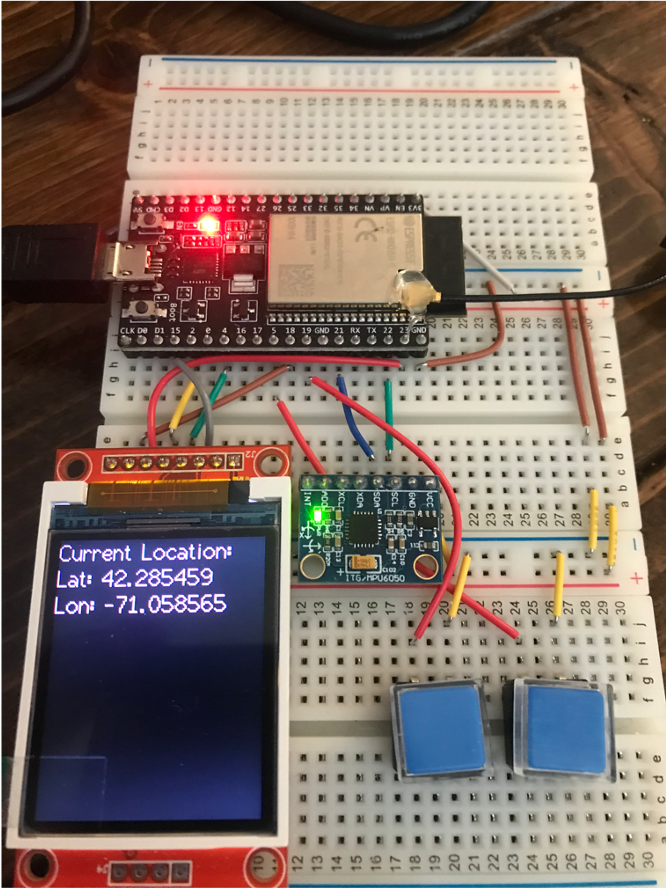
We'd now like to process the response returned by Google so that we can display the latitude and longitude of our location on the LCD. This does not mean that you are to just print the entire response to the screen. Doing that would just dump the JSON on there, and while JSON is among the more pretty data storage formats out there, it isn't what a person wants to see. We instead want the data within the JSON body so that it shows up like shown below:
"Aw darnit, here we go again. Let me bring up the strtok docs," you might be saying to yourself, and while that is one way to go about parsing JSON, the inherent nestable nature of JSON objects makes that quite an undertaking, especially if we want a robust solution, so bringing in a higher-level parsing library is likely the wiser choice10. For a higher level library we'll use ArduinoJson (by Benoit Blanchon). This is a very well-documented open-source library (docs are HERE) which allows us to convert between strings and functional data structures (and also the other direction and do a whole bunch of other stuff with JSON.)
Remember that from the perspective of the Internet and our Wifi-interfacing code, the body that gets returned is nothing more than a string of characters. It is the job of ArduinoJson to deserialize that string and produce a data structure which we can access in our native language (in this case, C/C++). It can also be used on the way up as well (serialize the data, which means turn it into a string, but we didn't do that today). Go to Tools>Manage Libraries and search for ArduinoJson. Install the most up to date version. Then retrieve and open an example from this library that is important for us today: File>Examples>ArduinoJson>JsonParserExample. This is a self-contained example, using a char array that is local to the script, but it can serve as guide for how to convert our response string into what is essentially something that acts like a C++ compatible JSON object.
lab04b_starter code, you need to include ArduinoJson.h at the top. This line is already there, but is commented out, so make sure to uncomment it.Ideally we could just dump the response into a DynamicJsonDocument, but it isn't that simple. It turns out that Google started tacking on some other info with their JSON responses. Consider the full raw body that Google sends back (shown below but you should see it in yours as well). You can see there is a number immediately before the returned JSON body and then a blank line and the number 0. The first number is the length of the response body in hexadecimal, but I'm honestly not exactly sure what is going on here. I'm sure there's a purpose, but it is in our way for this lab.
58
{
  "location": {
    "lat": 42.2854488,
    "lng": -71.0785474
  },
  "accuracy": 20
}

0
In order to get this raw body into a DynamicJsonDocument object, you'll need to cut that starting and ending stuff. Thankfully this isn't too hard. Since valid JSON will start and end with '{' and '}', respectively, we just need to find the index of the first '{' and the index of the last '}'. Two functions that you can use to find these markers are strchr and strrchr, both part of the string.h library (so check the docs on how to use that). Study the inputs to these functions carefully, and remember that a char literal is specified with single quotes where as double quotes are reserved for specifying strings. Using these functions together should give you pointers to within the response string that you can use to modify and point to things as needed to isolate the JSON in response so a DynamicJsonDocument object can be created. Once you create a valid DynamicJsonDocument, you can then access the member values you care about ("lat" and "lng", though study the JSON structure since there is some nesting) so you can display them! Each degree of latitude/longitude is quite large so it is important to not throw away decimals. Make sure to store the values you extract from the DynamicJsonDocument as doubles since they have better precision than floats. (we'll talk about this in Lecture 04 next week).
When finished, get the checkoff.
Footnotes
1and this is a very active area of research btw. It is not a solved problem.
2This can work pretty well when you have a good line-of-sight to several satellites in the sky, however the satellites are not geostationary, meaning they move (you can see real-time positions of the United States' GPS satellites here) and so GPS on its own can sometimes be difficult to work with, especially in urban environments where buildings can cause lots of multipath interference with the satellite signals. Outside of even this, GPS satellites are also subject to regional shutdowns. The US has been known to disable its satellites when they move over certain regions of the world to prevent particular governments or organizations from benefiting from the signals they broadcast. So GPS works, but it can have its problems. Your cell phone definitely uses GPS, but that isn't the only thing it uses.
46 bytes gives us 2^{48} unique identifying numbers, or about 281 trillion. While it is possible we will "exhaust" this space of values, it is likely not to occur for a while.
5During the Second World War, both sides took advantage of knowledge about the other side's AM and shortwave radio transmitters to aid in guiding bombers towards their targets. Along similar lines, during the Cold War, the United States was concerned that Soviet Bombers would use the known pattern of various broadcast radio stations across the country to aid in guiding themselves towards targets. For example, if a Soviet bomber was flying near Boston it would pick up a distinctive set of AM radio frequencies being broadcast that could help inform it that it must be near Boston. As a result, the US Government, set up a system where if the US was under attack most radio stations would go off the air and only all remaining stations would switch to periodically broadcasting on two fixed frequencies (640 kHz and 1240 kHz) in bursts and only with non-indetifying information. This was a major aspect of the Emergency Broadcast System. The idea was no matter where you were in the country, the Soviets would only be picking up the same two radio stations so that information would be pretty much useless for geopositioning purposes. If you look at radio receiver sets from that time, many will have special marks on them for those two frequencies so civilians would be able to easily tune their radios to the stations to get important messages.
6How exactly companies like Google and others get these vast datasets is a bit controversial. They used to just record them when their Google StreetView vehicles were driving all over the place. That was easy enough since those vehicles were basically going everywhere. However for the last ten years, most of their data comes from users self-reporting this info. Since your phone does have a GPS receiver and exists in a world where there is already a pretty solid archive of cell tower signal and WiFi signal location information, it is capable of determining where it is with very good accuracy. What will happen in the background is your phone will sniff out all nearby WiFi signals it sees and report them up to the main server along with the location information. This new information is then integrated into the current databases, allowing the system to continue to learn in a world where people are setting up and taking down WiFi access points all the time. The actual software that is used to merge all this data together are far from simple and involve machine learning, speedy databases, and many other cool things!
7Google actually gave us credits which we are being billed against! Thank you for your generosity, Google!
8dB is similar to dBm but measures a relative strength of two signals--in this case signal and noise. The value is calculated by taking 10\cdot \log_{10}\left(P_{signal}/P_{noise}\right).
9It is entirely possible that since we're using Google for Geolocation and then verifying the information also with Google, that Google could be completely lying to us and we're all just living in a simulation. Consider using a non-Google map for verification to combat this.
10but make no mistake, the higher level library is using strtok and associated functions under the hood.