Part selection
Please Log In for full access to the web site.
Note that this link will take you to an external site (https://shimmer.mit.edu) to authenticate, and then you will be redirected back to this page.
Learning Objectives
In this exercise, you'll get some experience doing one of the most common things as an engineer: selecting parts or components.
Part Selection
In developing a system, we need to figure out the bits and pieces that go into, whether those are HW or SW. Here we focus on HW, and specifically electronics components, in part because we tend to have less experience with that.
Let's be clear: picking parts is hard.
Have you ever spent an hour or two trying to find something on Amazon, looking through different options, trading off price, reviews, availability, and so on? Well, picking parts is like that...except harder. Because each type of part, be it a resistor, sensor, microcontroller, connector, gasket, etc., has its own language and key parameters that one needs to understand in order to choose it. As a random example, here is a 300-page book telling you how to pick O-rings. Yes, O-rings. And you can meet people who are experts at doing this after years of experience.
So yes, picking parts is hard, but the way to learn is to just start doing it. And, I should add, it's alot of fun. Sure, you can read some Dostoevsky or Nabokov and learn about the human experience. But we get to read datasheets! I love spending hours going thru datasheets to learn about parts and figure out the right one for my task. We hope you find it interesting as well.
Speccing a high-side load switch
All of our systems are battery-operated, and we want to use the smallest battery and have it last as long as possible. So we don't want to waste energy!
As we're learning in class, the way to do that is to sleep as much as possible. For many components, sleep modes are built in. For others, there may be an enable pin that you can use to the turn the part on or off, and maybe the component uses such low power that you can drive it directly from one of the ESP32's GPIO pins.
But not all components are like that. Some do not include an easy way to sleeop or turn them on or off, others have that functionality but it isn't exposed in the module or package that you can easily purchase. The point is -- sometimes we want to turn something off to conserve power, but we need some help to do so.
This isn't theoretical -- every year at least one team runs into this issue. Maybe this year it will be yours!
So we basically want a light switch that we can use to turn a part on or off. This is called a load switch. And we're going to spec on out in this exercise.
Here's an ideal model and more realistic model for what these parts do.
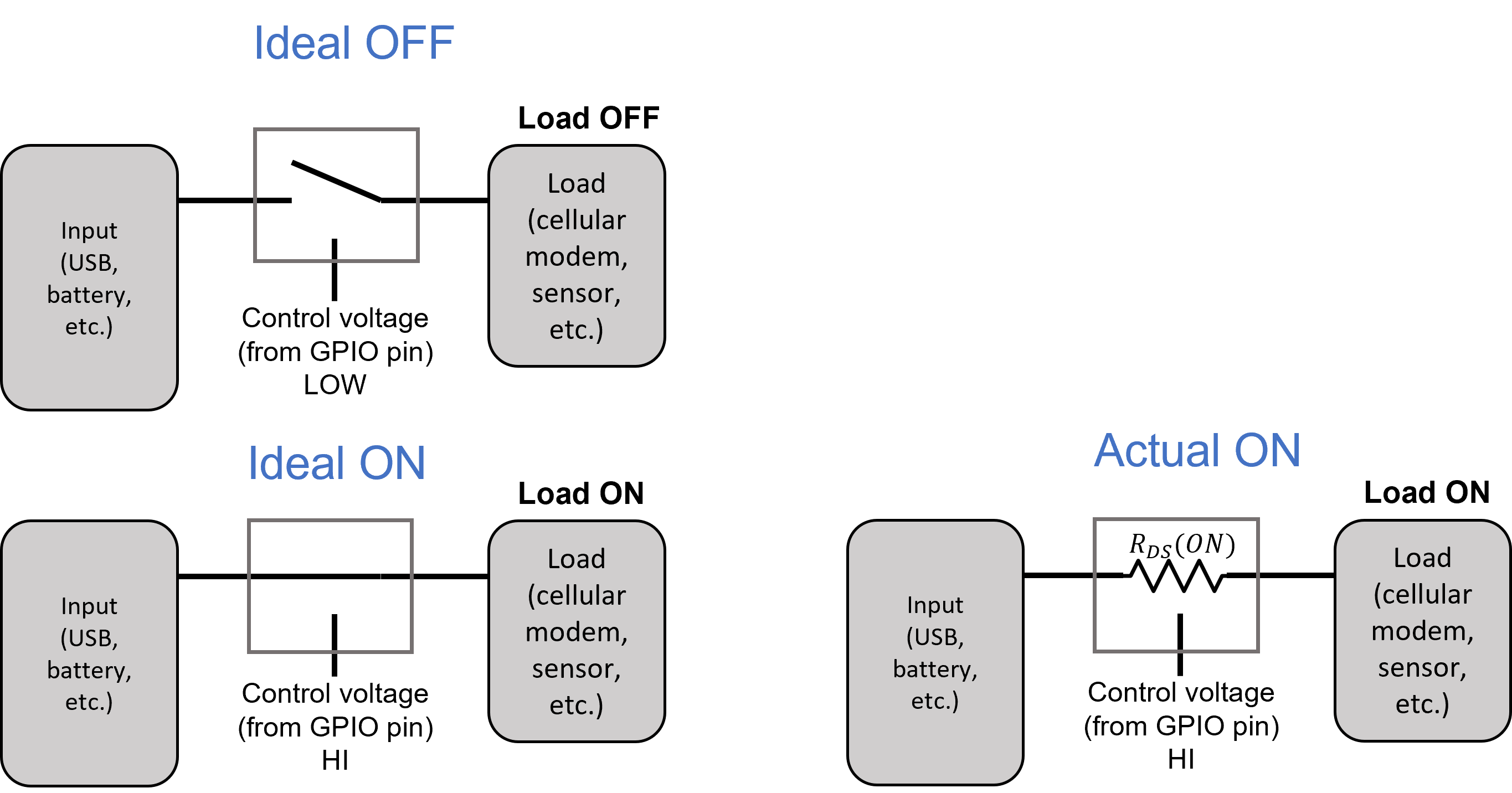
From this, we can start to identify specifications that we care about in selecting this part. You will be developing specs for your semester project, and if your project needs a particular functionality (like measuring RH/T, or detecting a large piece of meat going thru an opening) you'll need to decide on the specifications that the subsystem should meet. Let's go thru some of them for a load switch.
- High side or Low side: We can either switch the 3V3 (high side) or GND (low side). Either will open the circuit and break current flow. There are pros and cons of either approach. For our situation it doesn't really matter, but let's go with a high-side switches to avoid any issues of not having a good ground anymore.
- Control voltage: The load switch is turned on/off be a control signal. Since we're using an ESP32 that runs at 3.3V, and we probably want to use one of our GPIOs to control the switch, we want to make sure that 3.3V is an acceptable control voltage.
- Active low or high: Some parts turn the switch ON when the control voltage is driven to a high voltage. that's active high. Others turn the switch ON when the control voltage is driven low. That's active low. Let's choose an active high part.
- Input voltage range: Depending on your use case, maybe your input is a 12V source. Or 1.8 V. It will depend. But in our case, let's assume the input is no higher than the USB voltage (5.2 V), which is often the highest voltage in our system, and that we might want to go down to 2.5V. So we want a part that can switch between 2.5 and 5.2V.
- Current capability: How much current is going thru our load switch on its way to the load? It's going to matter if you are running 10 mA or 10 A. In our case, let's assume we're switching 100 mA. So we want a part that can switch 100 mA or more.
- RDS(ON): When the switch is on, it is not an ideal short between the input and output. As shown in the figure above, there is a small series resistance. That resistor will burn power and drop voltage. So we want to minimize that, realizing that smaller RDS(ON) will cost more money. If we want no more than a 50 mV voltage droop at max current, that implies RDS(ON < 500 mOhm).
One advantage of a load switch over just a bare MOSFET switch is that it includes various protection features.
- Short-circuit protection: This means that if the load is shorted, the device will sense that and turn off rather than just dumping current. Nice.
- Thermal shutdown: Related, if too much current goes thru the load so that it heats up, it will shut down rather than smoke. Nice.
- Reverse current blocking: If for some reason a higher voltage appears on the output side, it will prevent current from going back to the source. This is super useful.
- Output Discharge: When you turn the switch off, you want the load to turn off quickly. This will bleed the output voltage to ground quickly so that the load turns off ASAP.
There are other specs (switching speed, inrush current control, etc.) and so on that we don't need here, but you may need for another applications.
These specs above are specific to load switches. Many of the following specs will be more broadly applicable to parts you might need to specify.
- Availability: It's not useful if the ideal part is not in stock. So let's make sure we pick a part that is in stock. We like to buy electronics from Digikey, because it is reputable, has fast shipping, deals with low-volume orders, is domestic. One further note is that Digikey allows so-called "Marketplace" products, which is like Amazon Marketplace, basically Digikey is the portal but you're buying the part from a 3rd-party. Let's not do that. Sometimes this is a good idea, especially if you're already committed to a part or working on a legacy system, but in general things that are on Marketplace are not in the regular system for a reason (reaching end-of-life and/or not actually manufactured anymore).
- Product Status: Manufacturers develop new parts all the time, and accordingly retire older parts. We want a part with a status of "Active", so we know it's not going to go away soon.
- Back-Order, "Lead-Time is X", and/or "Contact Supplier": If you see this just treat it as if it is not in stock. This is like waiting on somebody to finish up their current relationship to get into a relationship with you. It will lead only to heartbreak. The only exception is if you've found "the one," but that likely won't happen to you here.
- Package: The package is often a big differentiator. For most applications, smaller is better, and so product develops tend to prefer parts with the abolutely smallest package. For us it's a bit different: we want a package that is relatively easy to hand-solder. There are dozens of different electronics packages. We know we want a surface mount (SMT) package and not a thru-hole one. With SMT, some packages that are relatively straightforward for us to solder are SOIC, DFN, QFN, even BGA.
- Cost: This is critical. We want our systems to be as inexpensive as possible. Let's choose a maximum price of \leq $0.50 when purchased at Digikey at 1000 part quantities. We need to specify the quantity since the price varies dramatically depending on how many you buy.
- "Tariffs May Apply": Yes, that's a thing nowadays. It could add to the cost, though you don't really find out till you add it to your cart. Let's ignore for now.
We could keep adding to the specs. But for the purposes of this exercise we have enough.
Finding Parts
Now that we know the type of part and its specs, we need to compare options.
Our first step is to find the right section in digikey. I tend to go to google and search for my term "load switch".
Usually a digikey part will appear on the first page of results.
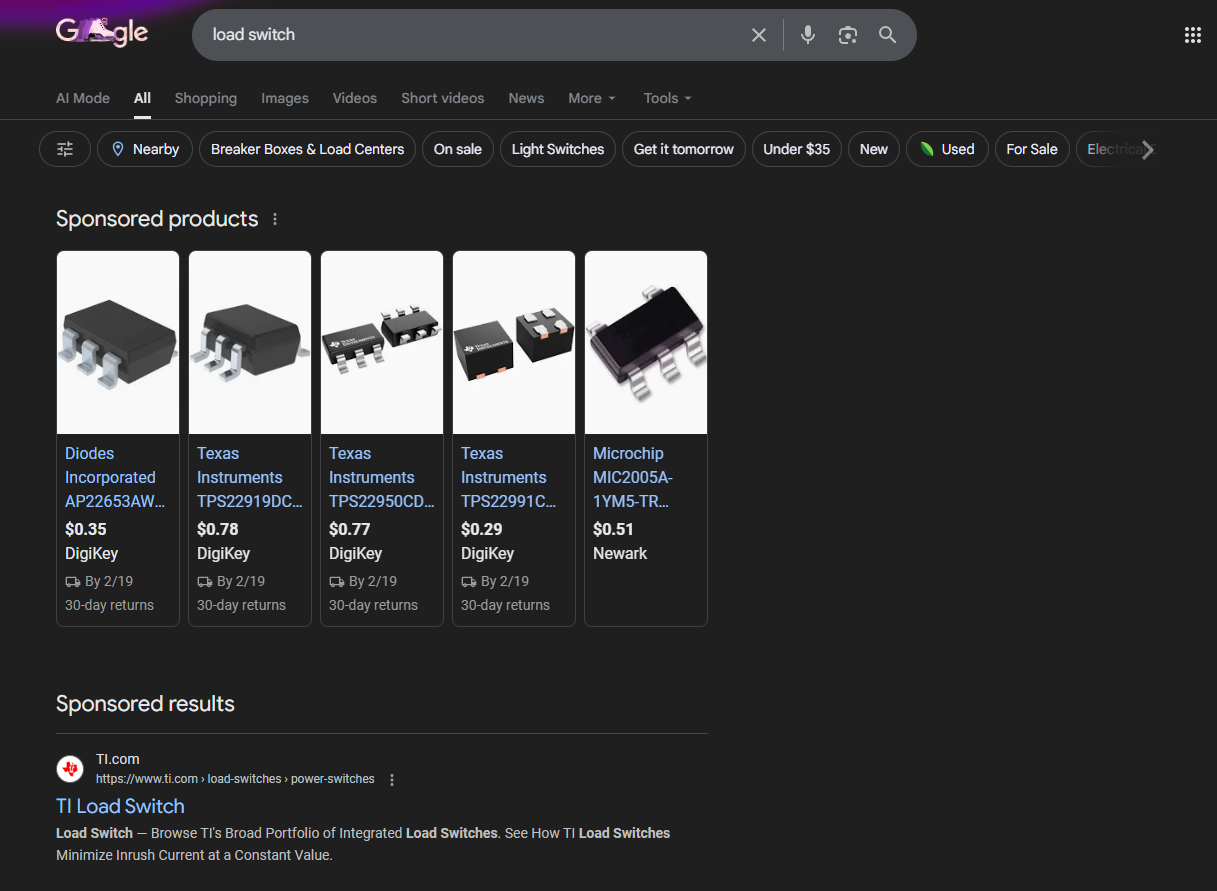
So I click on one of those chips. My goal is to find where in the Product Index this family of parts lives. And on here I can see it: "Power Distribution Switches, Load Drivers".
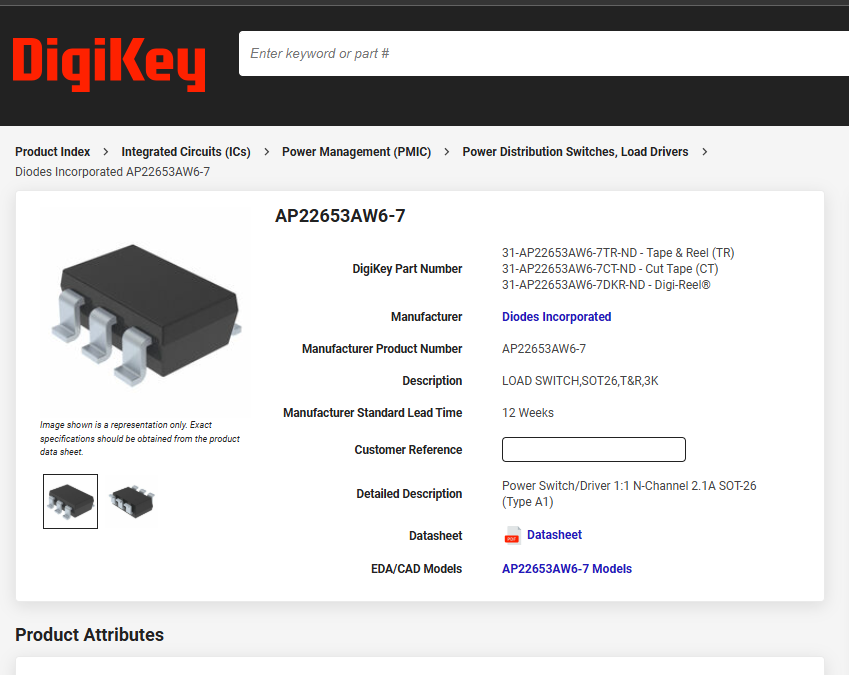
So click on that link and I get to where I want to be, the load switch parametric search.
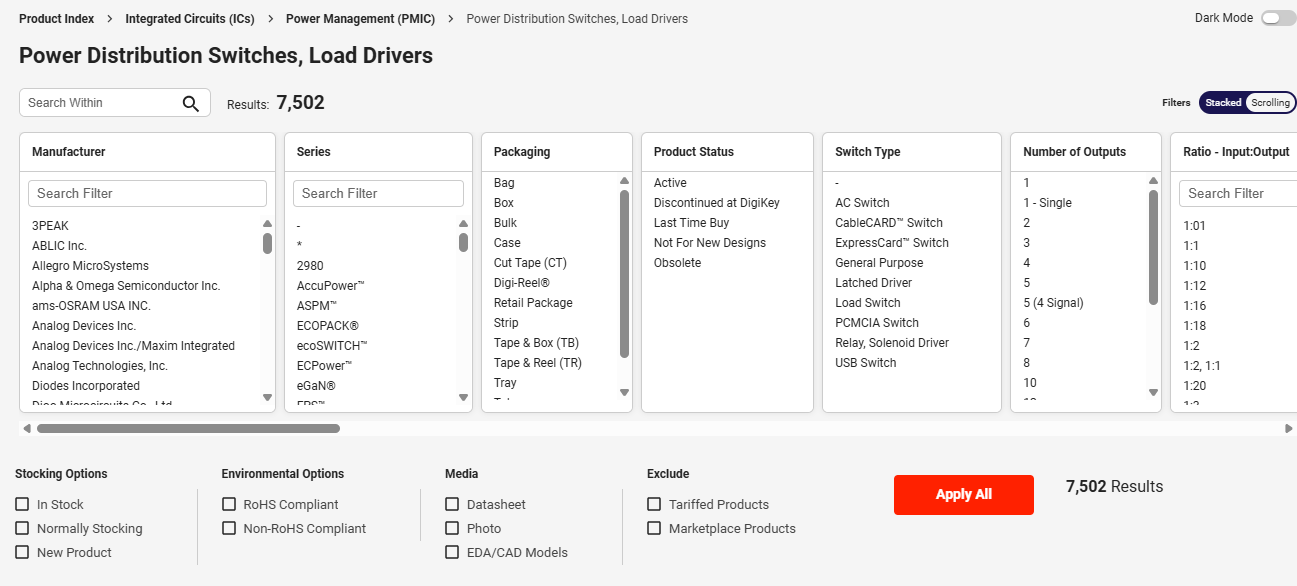
See see that there are 7,502 parts (it might change by the time you go there). And our task is to choose one from that list that meets our specs.
Downselection
One I select "In Stock" parts that are "Active" Product Status and Exclude "Marketplace Products", I get down to around ~2400 parts. Getting there!
Now we need to jump into the parametric search.
Let's do one column together.
We know we want at least 100 mA load current. We can see a column listed as "Current - Output (Max)". That sounds alot like load current. You can see that there are lots of choices, some grayed out. The grayed out ones are options already excluded by other selections we made. What we want to do is to select all the options that are 100 mA or greater, like so:
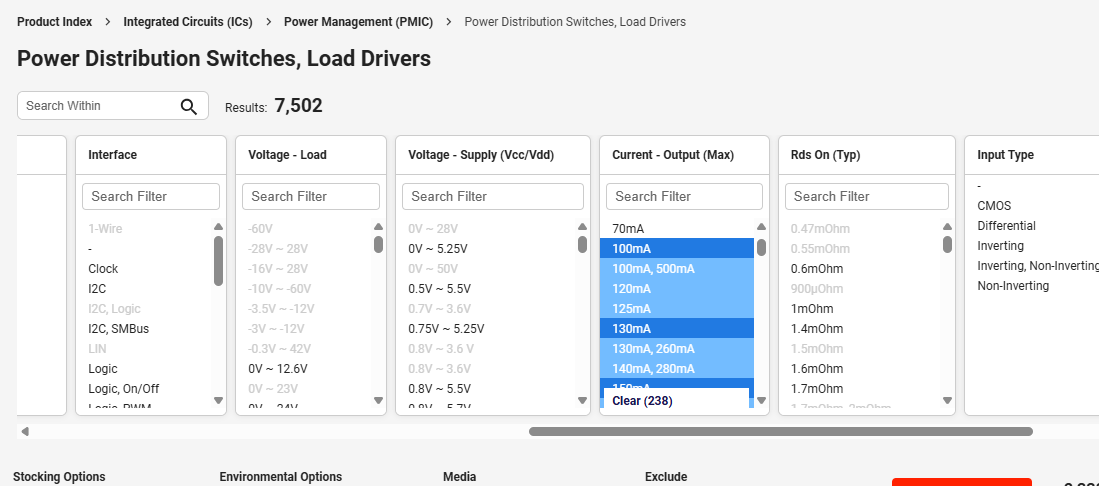
That only downselected a bit, suggesting that 100 mA is not a tough spec to meet (it isn't).
After I downselect on RDS(ON), Output Configuration (High side), and Interface (Logic or On/Off), I still have 1276 parts.
In practice, I tend to narrow down using the specs I am sure about, then I sort on price and/or availability, and start reading datasheets to see if the cheapest/most available one meets the rest of my needs.
Let's do some of that here.
Speccing a full part number
Sometimes there are many variants of a chip, and we need to use the datasheet to figure out which one we actually want to consider.
For example, in my parametric search I see a bunch of parts with AP2141 and AP2151 in the part number. Let's take a look at the datasheet.
Which part has:
- Turns the switch ON when the Enable input goes to LOW
- Comes in a package with the fewest pins

Another family of parts I see on the parametric search page are the Microchip MIC20xx family. Pulling up that datasheet, which part has:
- 0.8A current limit
- Turns on when the Enable input goes HI
- Includes CSLEW to slow down the turn-on
- Comes in 6-pin SOT-23 package
- Does not include their "Kickstart" feature
Comparing parts
OK, now that we know how to get to full part numbers, we've chosen 5 reasonable parts for you to compare. These are either cheapest or have most stock.
- TI TPS22919DCKR
- Diodes AP22916DCA4-7
- Diodes AP22652W6-7
- Diodes AP2141WG-7
- Microchip MIC2004-0.5YM5
Your job is to look through each of these parts to figure out which specs they do not meet.
Here's a suggested approach:
-
Find the part on the digikey website. When you get to the product page, Digikey will list a number of the specs for that part. So you can read those off easily.
-
Not every spec is on that page. So you'll also need to open up the datasheet and read through it to find some of the other specs.
As a reminder, here is our spec list, focusing on the specs we didn't already downselect to above:
- Control voltage: the range should include 3.3V as logic high
- Active low or high: High
- Input voltage range: from [2.5 or lower] to [5.2 V or great]
- Package: some sort of surface mount package with visible leads (so SOIC, QFN, DFN, etc... are fine, but BGA or equivalents with pins fully under the package and therefore does not count).
- Cost: \leq 0.50USD at 1000 part quantities.
- Short-circuit protection
- Thermal shutdown
- Reverse current blocking
- Output discharge
In the questions below, you'll enter a list of the specs that each part DOES NOT meet. So if the TI part does not meet the cost and thermal shutdown specs, you would enter [5,7].
For any part that meets all the specs, you enter an empty list [].
IRL
There are a few important differences I'd like to point out when you go to select parts for your semester project, or in industry.
First, you'll likely have to muscle thru the parametric search all the way to a single part, rather than have 5 carefully curated options to choose from.
Second, in many situations there is more than one part that meets spec. If that's the case, take the "W" and move on. Choose the cheapest option, or the most popular one.
Third, sometimes there are no options that meet spec. So you need to revisit your specs and relax one or more of them, which might involve talking with a team member, or another team, or the customer.
Me? I'd probably go with the TPS22919DCKR cause it's cheap and I'd actually be fine for this application ignoring the specs it doesn't meet.